

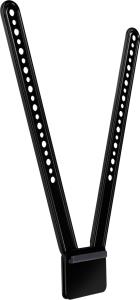
SECURELY MOUNT LOGITECH MEETUP TO A TV OR MONITOR
Logitech TV Mount for MeetUp securely holds the MeetUp ConferenceCam either above or below a flat-panel monitor and attaches to the industry-standard VESA mounting points available on most TVs and monitors.
ATTACH ABOVE OR BELOW MONITORS
The TV mount's unique design allows MeetUp to be mounted above or below a monitor. Attaching MeetUp below the TV tends to provide the most natural video experience, but this mount offers both options.
WORKS WITH MOST FLAT-PANEL TVS
Most TVs follow the VESA standard for locating mounting points on the back of TVs. The TV Mount for MeetUp features a swing arm design and multiple mounting holes to fit almost any flat-panel monitor.



















Every effort has been made to ensure the accuracy of all information contained herein. e-nitiative shall not be liable for any changes resulting in wrong product description, tax code and/or price. The shown information (specifications, prices, taxes) should be considered as an indication and can be changed at any moment and without any prior notice.
Design and development by